Your agents write the code now? At least review what they hand you. Reviewing means reading a diff, so let’s see what a diff actually is.
What does diff A B mean?
Think of A and B as two files. diff A B shows what changes are needed to turn A into B (A -> B).
-lines exist inAbut need to be removed to transformAintoB. They are inAand not inB.+lines don’t exist inAand need to be added to transformAintoB. They are inBand not inA.
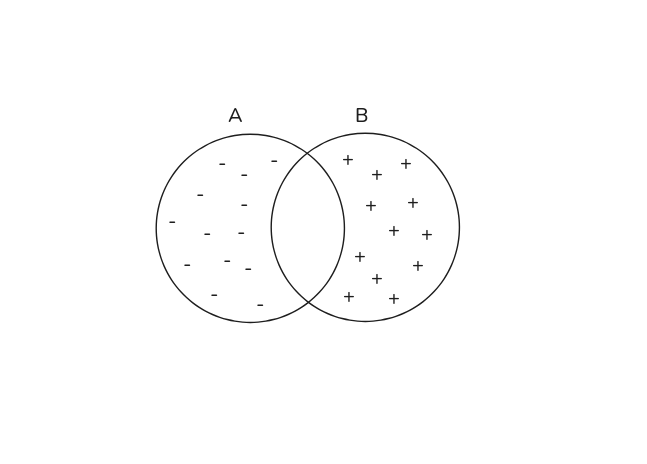
That is the whole concept. A is where you start, B is where you end up, and the diff describes how to get from A to B.
The defaults
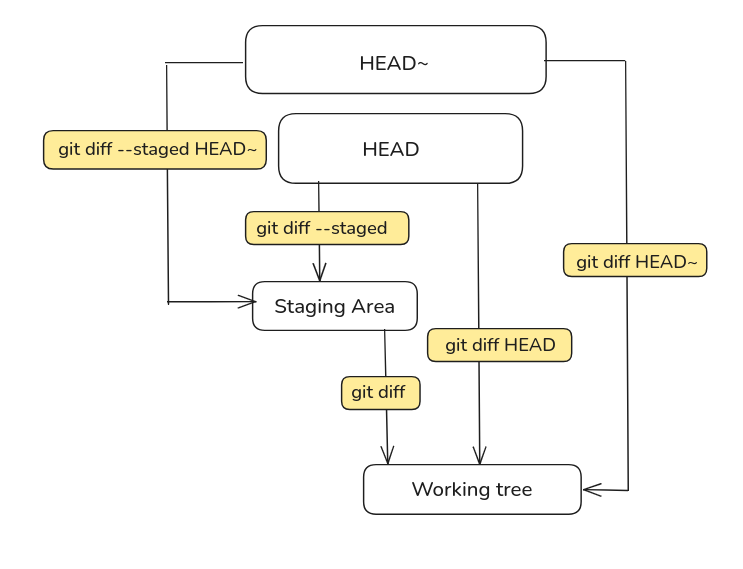
In everyday use A and B are rarely physical files on disk. They represent states in your repository such as commits, branches, the staging area, or your working directory.
The A -> B concept remains but you rarely need to specify both sides explicitly because Git infers them using smart defaults.
git diff
- A (start): the staging area
- B (end): the working directory
- Transform: staging area -> working directory
- Shows: changes not yet staged
- Question it answers: what have I changed since my last
git add?
git diff --staged (or git diff --cached)
- A (start): HEAD
- B (end): the staging area
- Transform: HEAD -> staging area
- Shows: the staged changes ready for commit
- Question it answers: what changes am I about to commit?
git diff HEAD
- A (start): HEAD
- B (end): the working directory
- Transform: HEAD -> working directory
- Shows: all changes (both staged and unstaged) since the last commit
- Question it answers: how is my working tree different from my last commit?
git diff A B vs A..B vs A...B
git diff A..B is equivalent to git diff A B. Both show the changes needed to transform A into B.
git diff A...B is equivalent to git diff $(git merge-base A B) B.
It compares the common ancestor of A and B with B, showing only the changes made on B since it branched off from A.
Comparing main and feature:
       c3---c4---c5  (main)
      /
c1---c2
      \
       f1---f2---f3  (feature)
git diff main...feature-> comparesc2(the merge-base) withf3(tip of feature)- Shows only the work done on the feature branch:
f3,f2,f1 - This is usually what you want when reviewing a branch, because it ignores whatever landed on
mainin the meantime
- Shows only the work done on the feature branch:
git diff main..feature-> comparesc5(tip of main) withf3(tip of feature)- Shows all differences between both branches
git show
git show gives you a commit: the metadata (hash, author, date, message) plus the
diff it introduced.
That diff is nothing new. It’s A -> B again, Git just picks A for you: the parent.
git show abc1234
# ↓ under the hood
git diff abc1234^ abc1234

# no argument? defaults to HEAD
git show
# ↓
git show HEAD
# ↓ under the hood
git diff HEAD^ HEAD
Useful flags
# ignore whitespaces
git diff -w

# compact summary of changes (files changed, insertions, deletions)
git diff --stat

# show only the names of changed files
git diff --name-only

# word-by-word instead of line-by-line
git diff --word-diff

# swap A and B
git diff -R

# only this file
git diff -- main.go